
Porting Save image as Type to Firefox
Summary: Save image as Type adds JPG, PNG and WebP options to Firefox's image context menu. Here's how it converts images, and what porting a Chrome extension to Firefox's MV3 event pages actually took.
Sites love serving images as WebP, and the thing I'm pasting into usually wants a PNG. The normal fix is save, open a converter, export, delete the original.
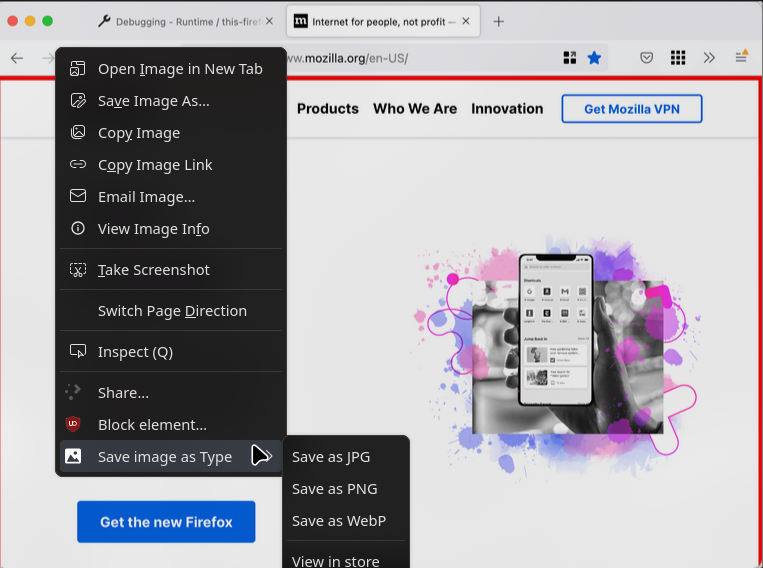
Save image as Type skips that: right-click an image, pick JPG, PNG or WebP, and the file lands on disk already in that format.
I didn't write it. The extension started as a Chrome project published on GitHub by image4tools (that repository no longer resolves, so I can't link it). In November 2024 I ported it to Firefox, and I've maintained the Firefox version since.
It's on addons.mozilla.org and the source is on GitHub. As I write this in October 2026, AMO reports a little over 22,000 daily users and a 4.2 average from 64 ratings.
What a click does
The whole thing is one background script, an options page and 15 locale files.
The menu
- No default set: the image context menu gets JPG, PNG and WebP entries plus an Options item.
- Default format picked in the options: you get a single "Save image as PNG" style entry instead.
That one took a small trick. Firefox folds an extension's items into a submenu once there's more than one, so the code creates exactly one item and returns early. Options is still reachable from about:addons.
The click handler
After that, the click handler takes the image's srcUrl and does three things:
- Fetch the bytes.
- Re-encode them on a canvas.
- Download the result.
Fetch first, then canvas
The fetch runs in the background script, which holds the <all_urls> host permission. The extension never touches the page's own <img> element.
It turns the response into a data: URL it owns, so the canvas never draws a cross-origin image and toDataURL() has no tainted canvas to complain about.
const res = await fetch(src);
const blob = await res.blob();
if (!blob.size) throw new Error("Fetch failed of 0 size");
const buffer = await blob.arrayBuffer();
const bytes = new Uint8Array(buffer);
let binary = "";
const chunkSize = 8192;
for (let i = 0; i < bytes.length; i += chunkSize) {
	binary += String.fromCharCode(...bytes.subarray(i, i + chunkSize));
}
const dataurl = `data:${blob.type};base64,${btoa(binary)}`;
The 8 KB chunks are there so String.fromCharCode never gets spread a multi-megabyte argument list.
The conversion
The conversion itself is plain:
function convertImage(dataurl, type) {
	return new Promise((resolve, reject) => {
		const img = new Image();
		img.onload = () => {
			const canvas = document.createElement("canvas");
			canvas.width = img.width;
			canvas.height = img.height;
			const ctx = canvas.getContext("2d");
			const mimeType = "image/" + (type === "jpg" ? "jpeg" : type);
			ctx.drawImage(img, 0, 0);
			resolve(canvas.toDataURL(mimeType));
		};
		img.onerror = () => reject(new Error("errorOnLoading"));
		img.src = dataurl;
	});
}
Decode, draw at native size, let the browser re-encode as image/jpeg, image/png or image/webp.
If the source is already a data URL of the requested type, it skips the canvas and saves the bytes as they are.
What the port actually involved
The mechanical part
The first Firefox commit was mostly mechanical:
- a
browser_specific_settings.geckoblock with a fixed add-on ID (SaveImageAsType@d7om.dev) browser.*calls throughout- the locale files
A few months later I moved everything into src/ and assets/. The release flow now goes through Mozilla's web-ext: lint, build, and sign with AMO API credentials.
Service worker vs event page
The background model was the part that kept coming back. On Chrome, an MV3 background is a service worker with no DOM, which is why the code converted images in an offscreen document.
Firefox's MV3 background, declared with background.scripts, is an event page, and it has a DOM. The port kept the offscreen approach anyway, and it went wrong in a quiet way.
The check for an existing offscreen document called clients.matchAll(), a service worker API that doesn't exist in an event page, so it always returned false. A new offscreen document got created on every save, and toDataURL() sometimes fell back to PNG.
That was issue #6, "Wrong saving format". The fix in July 2026 deleted that whole path and draws on a canvas right in the background page. It also dropped a permission.
A fallback that lied
An earlier bug had the same flavour. When the fetch failed, the code fell back to downloading the original URL under the new filename, so you got a file whose extension and contents disagreed. The fix was to pass the error along instead.
The same commit added a script that runs all six format pairs through Firefox and checks each output with ImageMagick's magick identify, which is how I know the conversion really happens.
Things I took out
Copy to clipboard
In January 2026 I added "Copy to clipboard". In April I removed it and bumped the major version.
- It was unreliable on Firefox.
- Asking for clipboard permissions on an image saver raised fair trust questions.
- Worse,
clipboardReadhad been requested and never used.
A permission you don't need is a bad look in a review queue and in a user's install prompt.
The save dialog
The other long-standing gripe was issue #8: the save dialog appeared every single time. saveAs: true had been hardcoded in download() since 1.0.0.
In August 2026 it became a "save silently" option, so Firefox goes back to its own download behaviour when you turn it on.
The rest
Igor Rückert sent in an updated Brazilian Portuguese translation.
Most of the rest of the maintenance is reading issues and finding the places where code written for Chrome assumes something Firefox doesn't do.


