
Soundcore Control: a Linux controller for earbuds that only had a phone app
Summary: Soundcore's earbud settings live in a mobile app. I built a native Linux controller in Rust on BlueZ and OpenSCQ30, with a TOML device list, a tray icon and an AppImage.
Soundcore earbuds and Linux don't get along very well. Everything worth changing on them (noise canceling strength, the equalizer, what a long press on the left bud does) lives in Soundcore's mobile app.
Pair them with a Linux laptop and you get audio, but none of those controls. Changing them meant picking up a phone.
Soundcore Control is the fix: a native Linux controller written in Rust that talks to paired earbuds through BlueZ. It puts the useful parts of the mobile app in a desktop window and a tray icon.
It started on August 10, 2026 as Liberty Control, built for exactly one device, the Liberty 4 Pro. Three days later it supported more models and got a less specific name.
The protocol is someone else's hard work
I didn't reverse-engineer the Soundcore protocol. OpenSCQ30 by Oppzippy already did.
Soundcore Control depends on its openscq30-lib crate as a git dependency pinned to a specific revision. That library:
- Owns the protocol: the packet format and the RFCOMM connection to the earbuds.
- Exposes generic settings: every feature is a generic
Settingkeyed by aSettingId. - Ships translations, so control labels follow your system locale for free.
Mapping settings to the UI
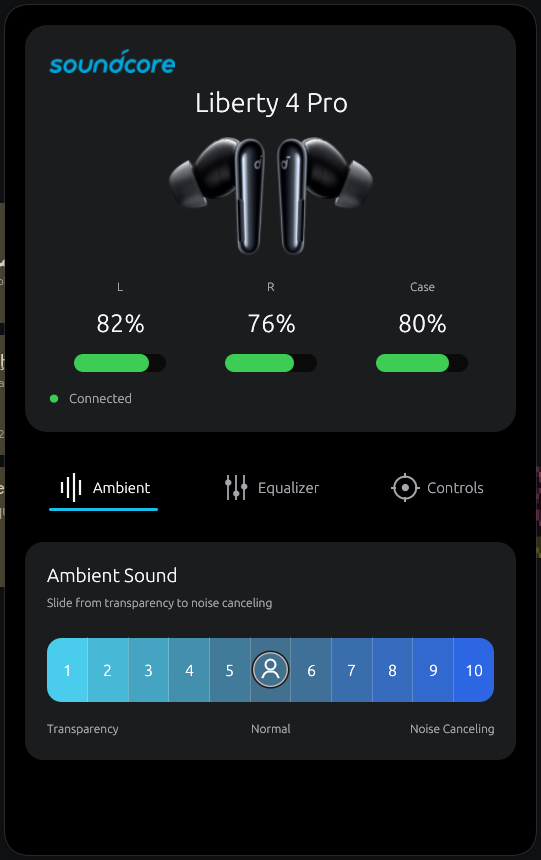
My code sits on top. domain.rs maps OpenSCQ30's settings into the types the UI needs, and turns UI commands back into setting writes.
The ambient slider is a good example:
- Levels 1 to 5 write
Transparencyplus a manual transparency strength. - Levels 6 to 10 write
NoiseCancelingplus a manual noise canceling strength.
Talking to BlueZ
For BlueZ directly I use bluer, which talks to bluetoothd over D-Bus. That's how the app disconnects the earbuds from the tray.
It's also how a background --watch mode notices a known device connecting and starts the app in tray-only mode.
Supported devices are a TOML file
The first version had the Liberty 4 Pro's name and model hardcoded. When I added more models I moved the list into assets/devices.toml, which gets compiled into the binary and parsed once at startup:
[[device]]
model = "SoundcoreD1202C"
bluetooth_name = "soundcore R60i NC"
display_name = "R60i NC"
icon = "r60inc.png"
# Confirmed on hardware: this device has no manual ambient range settings.
supports_manual_ambient_ranges = false
model has to match a variant of OpenSCQ30's DeviceModel enum. A typo panics at startup with a message naming the bad entry.
Adding a device means adding an entry and maybe a PNG. No Rust.
Which devices are tested
The list today:
- Liberty 4 Pro
- R60i NC
- P20i
- Life Q30
- Space One Pro
The README is upfront about how much of that is tested. The Liberty 4 Pro is verified. The Bluetooth names for the P20i, Life Q30 and Space One Pro are guesses following the "soundcore <Product>" pattern.
If yours doesn't show up, the advertised name is probably different, and an issue with the real name fixes it.
The flag that exists because of a crash
That supports_manual_ambient_ranges field earned its place. Some earbuds occasionally leave out the active ambient strength on startup, so on the Liberty 4 Pro the app writes one on connect.
The R60i NC has no manual ranges, only discrete modes. Asking openscq30-lib to write a setting a device doesn't register makes it unwrap() on None.
The worker thread died quietly and the UI sat there waiting.
The two-part fix
- Gate the repair. It only runs for devices with the flag set, and devices without it get a mode picker instead of the slider.
- Catch panics. The worker thread catches them, so the next surprise shows up as an error message:
let outcome = std::panic::catch_unwind(std::panic::AssertUnwindSafe(|| {
    runtime.block_on(run_device(command_receiver, &thread_events))
}));
match outcome {
    Ok(Ok(())) => {}
    Ok(Err(error)) => {
        let _ = thread_events.send(DeviceEvent::Error(format!("{error:#}")));
    }
    Err(panic) => {
        let message = panic_message(&panic);
        tracing::error!(message, "Bluetooth worker panicked");
        let _ = thread_events.send(DeviceEvent::Error(format!(
            "The Bluetooth worker crashed unexpectedly: {message}"
        )));
    }
}
One thread, two channels
That worker runs on its own thread with its own Tokio runtime. The egui loop sends commands in over one channel and polls events out of another, so the UI never touches Bluetooth directly.
The tray follows the same thread-plus-channels pattern.
The window and the tray
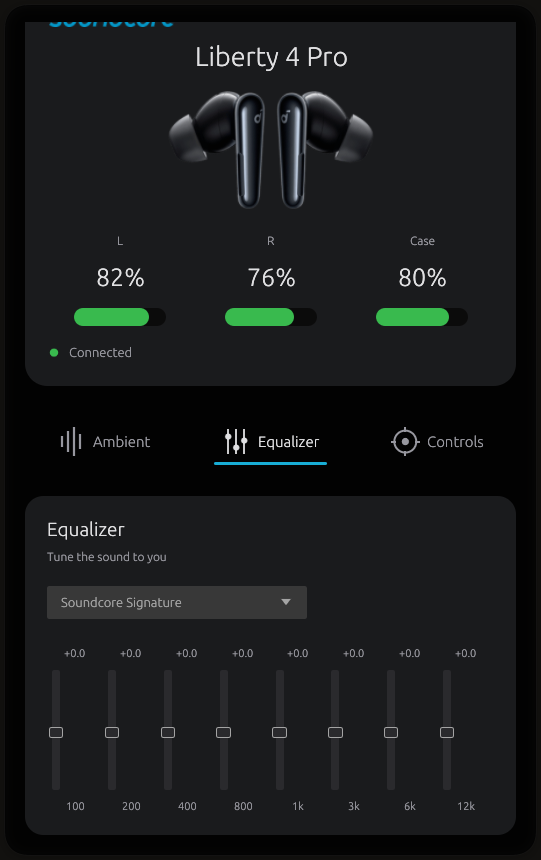
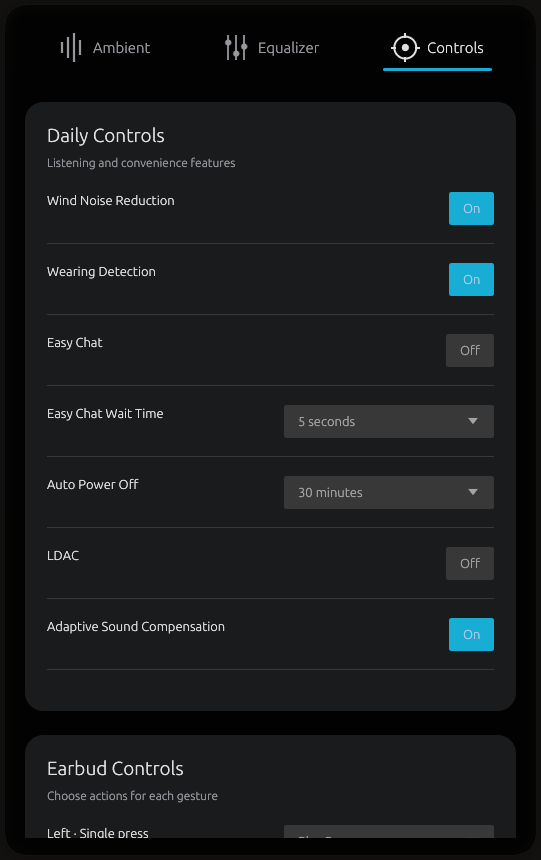
The UI is eframe/egui, running on Wayland or X11. There are three tabs:
- Ambient has the slider or the mode picker.
- Equalizer has the Soundcore presets and an eight-band custom EQ.
- Controls shows daily settings like wearing detection, Easy Chat, wind noise reduction, auto power-off and LDAC, plus press and slide gestures per earbud.
Controls only appear when the connected device reports them, and a tab with nothing in it is hidden. The P20i has no noise canceling, so it gets no Ambient tab.
Closing to the tray
Closing the window doesn't quit. The tray icon (StatusNotifierItem, through ksni) keeps the connection alive and gives you:
- battery levels
- an ambient mode submenu
- disconnect
- reopen
- quit
Headphones without a case show one battery level instead of three.
Shipping it as an AppImage
You can build from source with install.sh, which also sets up the watcher as a systemd user service.
Most people just want to run the thing, though. Pushing a version tag triggers a GitHub Actions workflow that:
- builds an AppImage with
linuxdeploy - attaches it to the release, with notes generated from the commit log
The AppImage is GUI only. It has no stable path on disk for a systemd unit to point at, so the auto-launch watcher stays an install.sh thing.
Getting it
The current release is v0.3.1, on the releases page. It's GPL-3.0-or-later, unofficial, and not affiliated with Soundcore or Anker.
If you own one of the unverified models, I'd like to hear what name it advertises.


